Search results
Query: edi file
Links: 136 | Categories: 0
-
 Maintaining vintage Eddystone receivers often presents unique challenges, as detailed by Victor Jenkins in his refurbishment of an EA12, where his deep understanding of RF circuits ensures optimal performance for daily shortwave listening. Similarly, Gerry O’Hara VE7GUH, a prolific contributor to the EUG website and a trustee, meticulously documented his restoration of an Eddystone S830/2, even addressing an unusual instability issue with a follow-up postscript article and YouTube videos demonstrating the fix. His work, along with numerous other articles on the "Restorations" page, showcases a master's approach to bringing vintage sets back to factory specifications or better. Beyond technical restorations, the EUG also shares compelling historical narratives. One such story recounts the discovery of a long-lost 78rpm recording featuring Eddystone Radio Ltd.'s founder, George Stratton Laughton, and other key figures discussing the company's wartime and post-war contributions to shortwave communications. This six-minute BBC production, transcribed into an MP3 file by Peter Carney, offers a rare auditory glimpse into the company's legacy, highlighting its role in supplying equipment to police, ministries, and expatriate British workers. The community aspect thrives through shared experiences, like Roger Trickett's anecdote about his Eddystone EC10, which has been continuously powered for 50 of its 54 years, traveling across continents and enduring various modifications. Another intriguing account from Roy GM4VKI details the "S640 Identity Crisis," where a seemingly standard S640 receiver turned out to be a masterfully engineered 80/20-meter SSB transceiver built into the original chassis by GI3ZX, showcasing incredible ingenuity from a bygone era of amateur radio.
 -
 The W0IS resource outlines methods for finding historical US amateur radio call signs, particularly for genealogical research. It highlights the comprehensive collection of digitized call books from 1906-1996 available at leehite.org, stored as searchable PDF files. These resources significantly simplify what was previously a laborious manual search through physical call books, which were typically indexed by call sign rather than name. The guide details specific search techniques for various eras. For early radio days (1913-1923), government call books are readily available and searchable online via Google Books and hathitrust.org. For the period between the 1930s and 1980s, when private publishers like "Radio Amateur Call Book Magazine" dominated, the resource points to archive.org for scanned editions (1938, 1940, 1948, 1972) that support full-text OCR searches, despite potential scanning errors requiring flexible search terms. It also provides strategies for navigating Google Books' "snippet view" for the 1952 call book, including searching by name or address and interpreting often illegible snippets. The resource suggests cross-referencing findings with hamcall.net for call sign verification from 1921, 1954, 1960, 1969, and 1983 onwards. Additionally, it lists physical call book collections at institutions like the Pavek Museum of Broadcasting and individuals like W3HF, offering avenues for deeper research when digital methods fall short.
 -
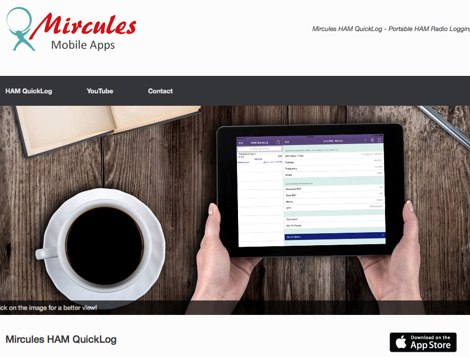 Mircules HAM QuickLog provides a mobile logging solution for amateur radio operators, supporting quick contact entry on iOS and Android platforms. It features multiple log file management, instant callsign information display including Country, ITU zone, CQ Zone, and DXCC number, and robust ADIF and CSV import/export capabilities. The application is designed for efficient logging with optional fields and default values, streamlining the process for both shack and field operations. The software includes dedicated support for POTA, SOTA, and IOTA activations through specific fields like MY_SIG_INFO, SIG_INFO, MY_SOTA_REF, IOTA, and MY_IOTA. A specialized contest mode offers real-time dupe checking and automatic TX exchange updates to enhance contest efficiency. Integration with QRZ.COM and HAMQTH.COM allows for direct operator information lookup and import, while Open Street Maps integration provides geographic context for contacts. The application also features a notes and scratchpad function for each log file.
 -
 A blog about ham radio. A blog dedicated to cool stuff like ham radio, birdwatching and bus timetables
 -
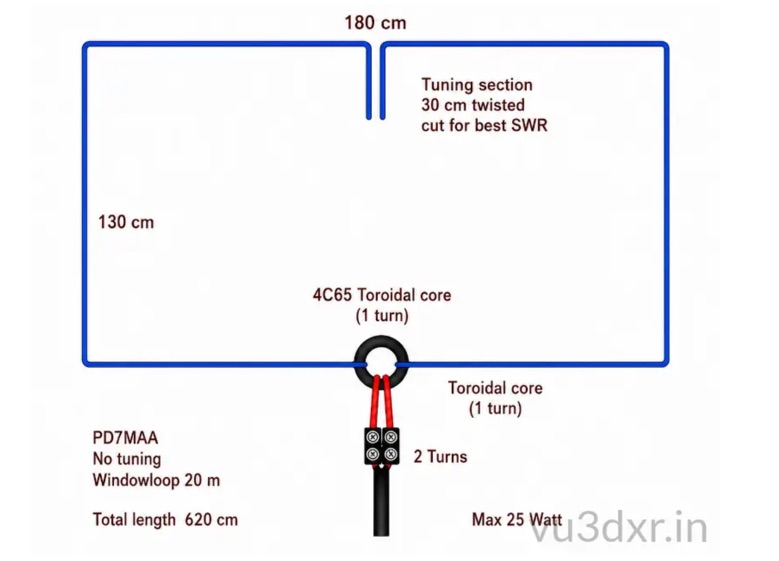 A 20-meter window frame stealth antenna, based on a design by _PD7MAA_, utilizes a single 620cm wire loop for discreet installation. The feeding mechanism employs a _4C65_ toroidal core, where the antenna loop functions as a single-turn secondary, and the feedline wraps twice. Tuning is achieved via a 30cm twisted wire stub, allowing for SWR adjustment within the 20m band. This design is specified for QRP operation, with a maximum power limit of **25 Watts** to prevent core saturation or arcing. Wire selection recommendations include thin, insulated copper wire (0.75mm to 1mm) for blending with architectural elements. The guide focuses on practical construction steps for a low-profile 14MHz antenna.
 -
 Project Ham: Cushcraft MA5B installation by Gary VE7AS
 -
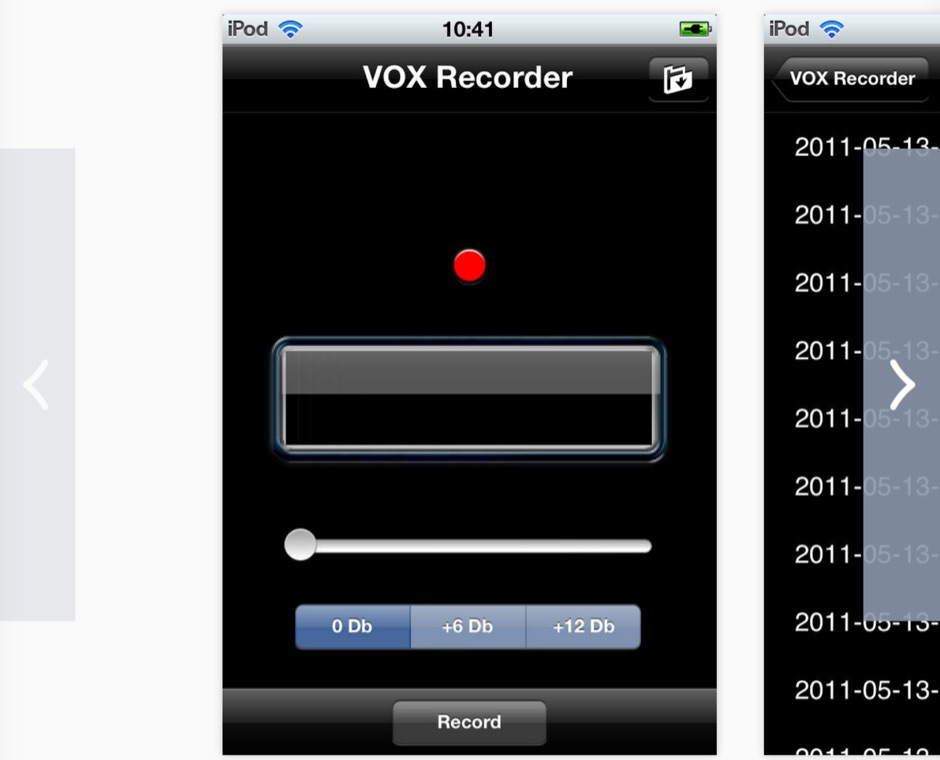 Vox recorder is activated by voice and sounds exceeding a threshold. It saves for every record a .caf file that you can play, delete or send by email. Useful for surveillance records, hamradio scanners, and many many other applications. You'll be surprised to hear what happens in an all night using Vox recorder.
 -
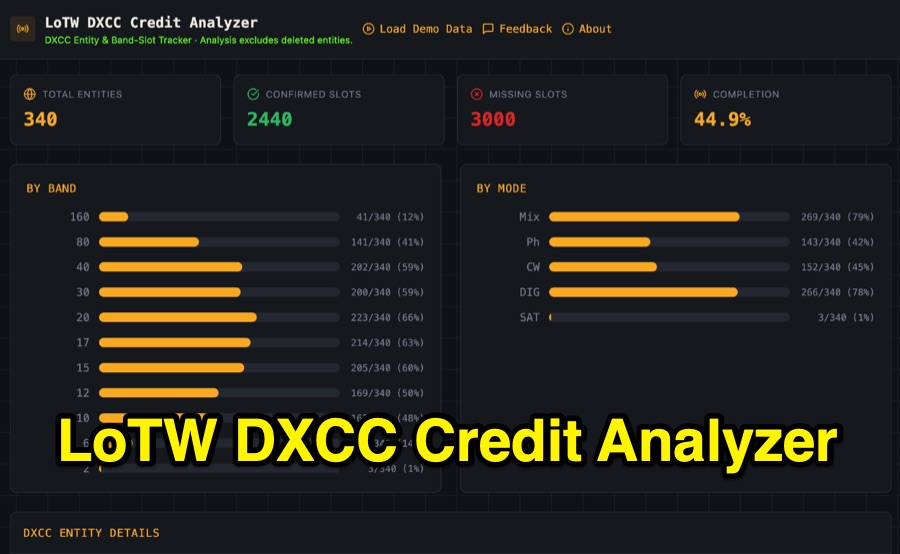 Visualizing DXCC award progress often requires manual parsing of Logbook of the World (LoTW) reports, which can be time-consuming and prone to error. This web-based utility streamlines the process by allowing hams to upload their LoTW DXCC Credit Report spreadsheet, providing an interactive dashboard for tracking confirmed entities, bands, and modes. It processes .xlsx, .xls, and .csv files, performing all calculations client-side within the browser for privacy and speed. The tool presents a comprehensive stats overview, detailing total entities, confirmed slots, and overall completion percentage. It includes progress bars for bands from _160m_ through _2m_, and modes such as CW, Phone, and DIG. A sortable DXCC Entity Details Table lists each entity, its confirmed count, and specific missing band/mode slots, with a CSV export option. Further features include a Band/Mode Matrix grid for granular confirmed status per entity, toggles for specific bands like _6m_ and _2m_, and tracking for DXCC Challenge progress across 10 eligible HF/VHF bands. It also highlights nearly complete entities and identifies most-wanted DXCC entities based on the uploaded data.
 -
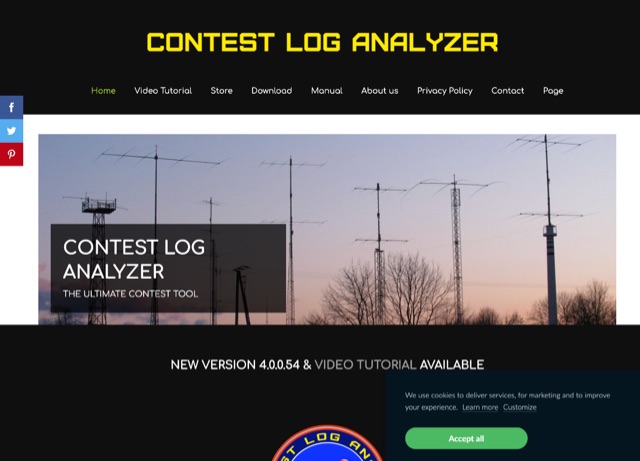 The complete software suite to Edit, Analyze, Generate Statistics, View multiple logs simultaneously, Map QSOs, Import and Export to Cabrillo or ADIF files. The Contest Log Analyzer has been developed as a complete database management application, where you can create separate Databases, containing several Logs, a convenient way to save, in one place only, all your log files that accumulate over the years. It runs on Mac and Windows, and it is a commercial product.
 -
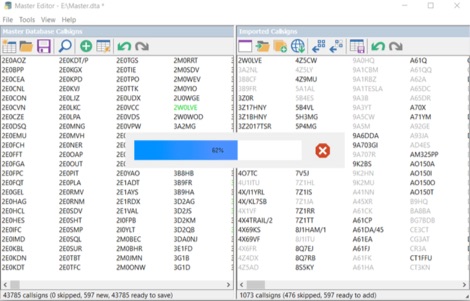 Master Callsign Database Editor allows to create and modify Super Check Partial database files used by many contesting programs in DTA and SCP formats. The files produced by Master Editor in DTA format can be used with CT, WriteLog, TRlog, SD, and others. The SCP versions of the produced files are for use with Win-Test, N1MM+, and others. Master Editor allows to create a callsign database from a separate log or from a set of logs in the Batch Import mode.
 -
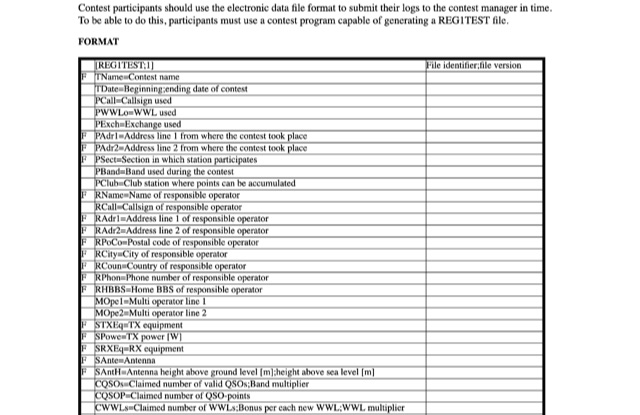 EDI is a common electronic data file format required to submit contact logs. Very popular among contest logs formats.
 -
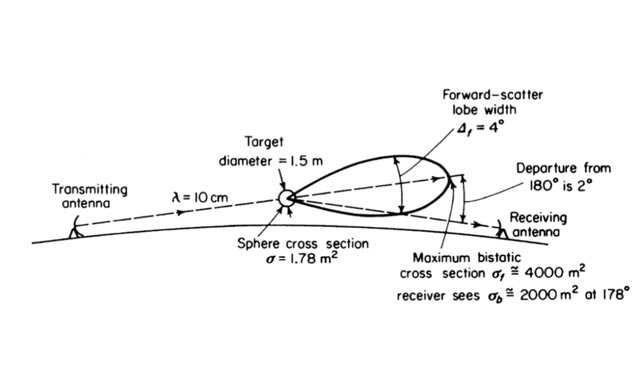 Operating on Airplane scattering. Scattering of radio signals by airplanes. An introduction to operating ariplane scattering, using aircraft to redirect RF that would otherwise be lost in space. Antenna Pointing, Doppler Shift/Digital Modes, using digital modes to operate airscatter.
 -
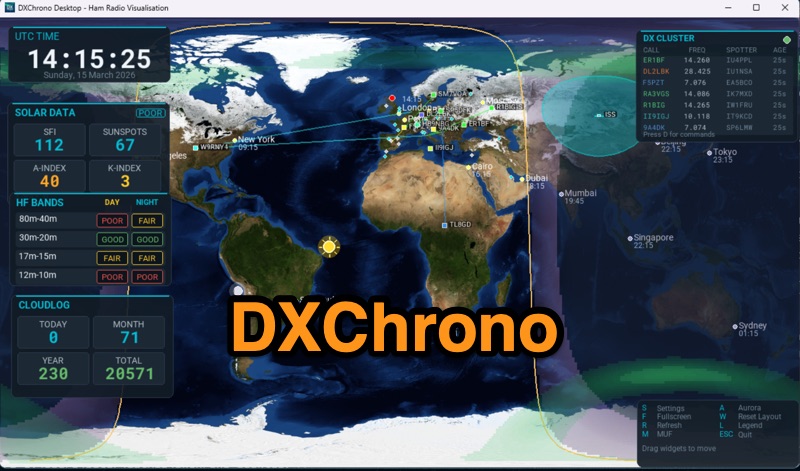 DXChrono Desktop presents a comprehensive suite of real-time amateur radio data, including NOAA solar indices, HF band conditions, and a worldwide _F5LEN tropo_ overlay for VHF openings. It integrates live spots from Telnet DX Cluster, PSK Reporter, and Reverse Beacon Network, displaying them on a dynamic 3D globe or 2D flat map. Additional features include aurora and MUF layers, QTH display with optional cities and grid/CQ/ITU layers, and dedicated support for SOTA and POTA activations. The software also offers a Watch List for callsign alerts and Sun/Moon Az/El widgets for satellite and EME operations. The application provides extensive contest and logging context through integration with _N1MM Logger+_ UDP, Cloudlog API, QRZ Logbook, and ADIF file support, allowing recent QSOs to be mapped directly. A Special Event mode is available for club stations, enhancing field day operations. DXChrono Desktop runs on Windows, macOS, Linux, and Raspberry Pi 4/5, requiring a 64-bit OS and at least 4 GB RAM for optimal performance, distinguishing it from simpler HamClock-style appliances.
 -
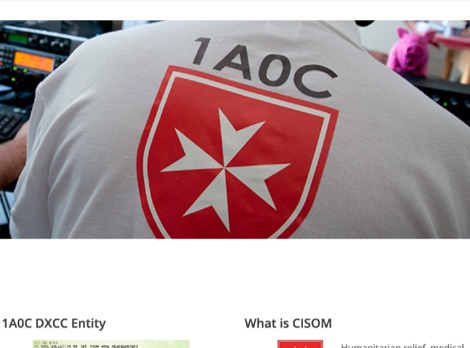 Since January 1, 1982, 1A contacts have been eligible for **DXCC** credit, making the prefix highly sought after by the amateur radio community for over 41 years. The 1A0C station, operated by the Order of Malta's Italian Relief Corps (CISOM), engages in DXpedition activities with a dual purpose beyond simply providing a rare "new one" for DXers. For instance, the July 26 - August 2, 2023, operation specifically channeled received donations towards reconstruction efforts for flood victims in Romagna, aligning with CISOM's humanitarian mission. The site outlines CISOM's broader scope, which includes impartial humanitarian relief, medical assistance, and emergency support for natural disaster victims, emphasizing respect for diverse beliefs. This approach integrates high-profile amateur radio operations with significant charitable outcomes.
 -
 List of Worldwide HF Beacons published by RSGB. The beacon service is a vital part of amateur radio propagation knowledge. Updates to the HF list, which is is a heavily edit form of the G3USF list, are continued by the current committee. It now only contains beacons that are known to be active and have been heard recently.
 -
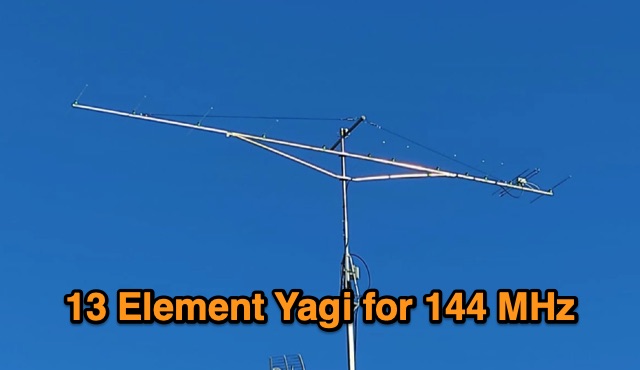 A homebrew 13 elements yagi antenna for two meters band. These project includes two model of the same antenna with a 6 and 7 meter boom length. Detailed pictures and nec files are available for download
 -
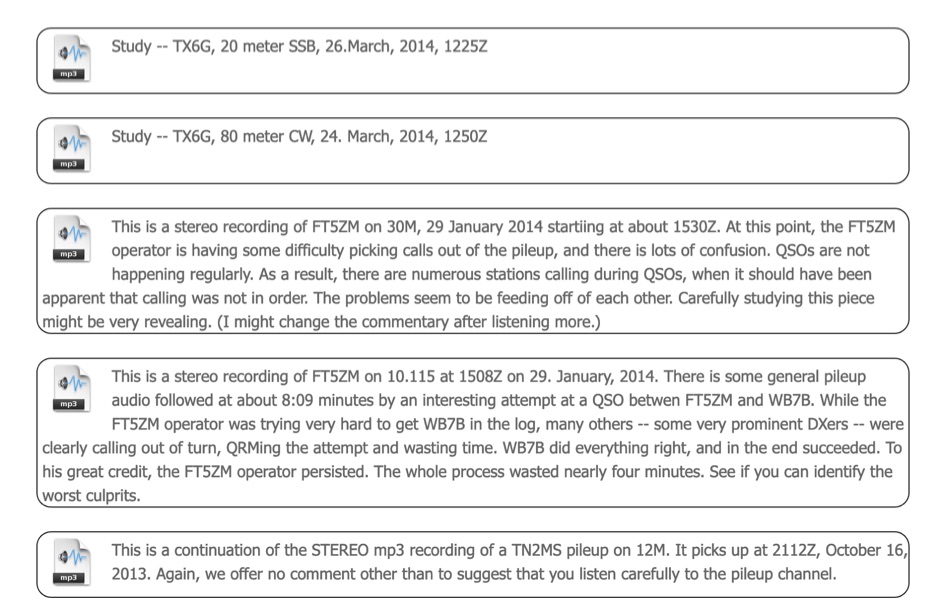 A collection of audio recordings of some DX Peditions used as case studies to evaluate dxspedition operatios behaviour and calling stations. These audio files are excerpts from real pileups recorded directly off the air in MP3 format
 -
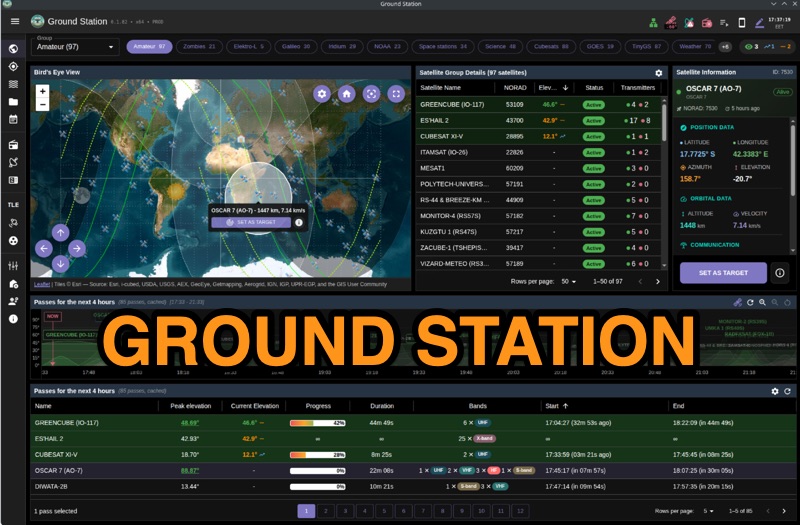 Ground Station offers real-time satellite tracking and radio communication capabilities, primarily for amateur radio operators engaged in satellite operations. It utilizes **TLE data** from sources like CelesTrak and SatNOGS for precise orbital prediction and integrates with various SDR devices, including RTL-SDR, SoapySDR, and UHD/USRP radios, to receive live signals. The software provides automated antenna rotator control and **Hamlib-compatible** rig control with Doppler correction, crucial for maintaining signal lock on fast-moving LEO satellites. It supports IQ recording in SigMF format and decodes several digital modes such as SSTV, FSK, GFSK, GMSK, and BPSK with AX25 USP Geoscan framing. Dedicated interfaces are available for satellite tracking, SDR waterfall displays with live transcription and packet decoding, and telemetry packet viewing. Users can manage TLE data synchronization and SDR hardware, along with browsing decoded outputs through an integrated file browser. An observations dashboard and DSP topology view further enhance the operational experience, providing comprehensive tools for monitoring and analyzing satellite passes.
 -
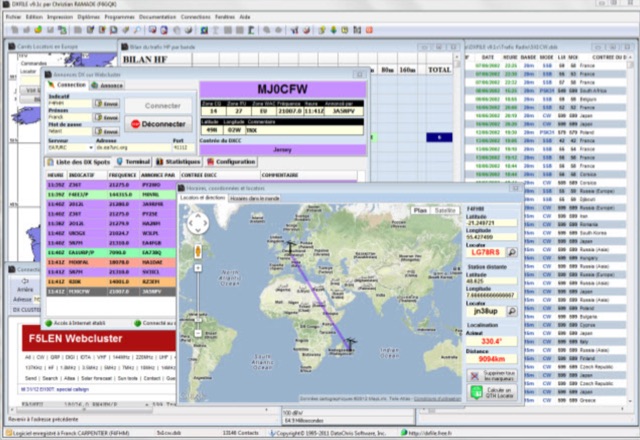 DXFile is a Windows shareware application designed for amateur radio operators, providing comprehensive log management capabilities. The software, developed in Pascal, facilitates real-time and deferred QSO entry, automatically populating fields like frequency, mode, and DXCC country based on user input and system time. It includes features for searching, modifying, and deleting QSO records, with options to sort logs by date, callsign, or entry order. The program offers various printing functions, including QSL card labels in multiple formats, and can generate standard logbook printouts. Beyond basic logging, DXFile integrates modules for tracking progress towards major operating awards such as DXCC, _IOTA_, WAZ, WAS, DDFM, and DIFM. It provides detailed summaries of contacts by band and mode, including graphical representations of HF traffic. A dedicated QSL Manager module assists in processing received QSLs, allowing users to mark confirmations and print multi-line QSL labels. The application also incorporates a DXCC list viewer, which can be updated to ensure accurate country and zone data for logging and award tracking. A distinctive feature is its HF propagation prediction module, which calculates optimal frequencies and signal levels for paths between **250 km** and **6000 km**, considering both E and F layer ionospheric conditions. This module helps operators determine the best times for long-distance contacts. Additionally, DXFile includes a _Web-Cluster_ interface, enabling connection to various DX cluster servers like DXLITE, DXSCAPE, and NC7J for real-time spot information.
 -
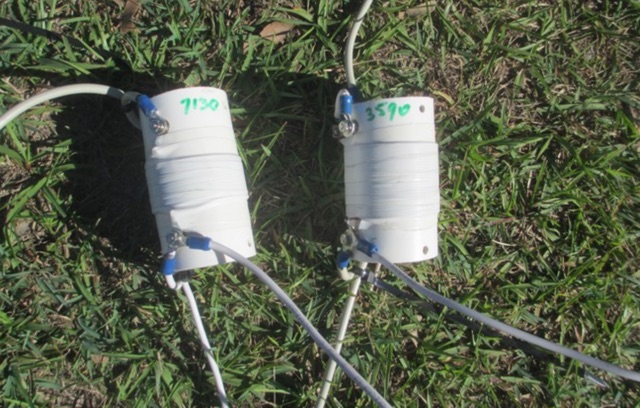 A Trapped dipole inverted V antenna for lower HF Bands. Construction details are for temporary installation. Permanent installations will require additional ruggedising and waterproofing however the basic electronics concepts remain the same. This project includes SWR plots for the three bands and pictures details of the homemade traps.
 -
 Constructing a 5-element quad antenna, the author aimed for low cost and simplicity, resulting in an effective design with 11 dBi gain and SWR of 2:1 or better across the 2-meter band. Using wood and dowels, the antenna costs under $8 and takes less than two hours to build with basic tools. The model predicts excellent performance, confirmed by ARRL Lab measurements. Practical field results demonstrate improved communication, even in simplex mode.
 -
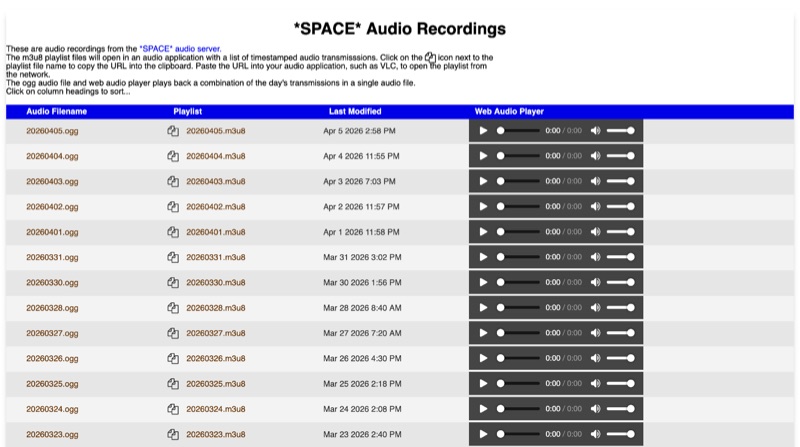 The *SPACE* Amateur Radio over Internet Protocol (RoIP) system offers public audio transmissions from NASA Mission Control and astronauts, primarily for educational purposes. This service streams NASA public media sources, including *Artemis II* and the ISS public audio channel 2 feed, which predominantly features English communications. Astronaut activities on the ISS typically occur between 0700 UTC and 19:00 UTC, with transmissions most common during early mornings USA time, alongside special events such as launches or spacewalks. Users can connect to the live stream via EchoLink to the *SPACE* conference, via IRLP to the 0100 experimental reflector, or via Allstar to node 516221. EchoLink connections utilize the GSM CODEC, while IRLP and other connections default to uncompressed or u-law CODEC. The service notes that long periods of silence are common, and NASA audio sources can be periodically unavailable or noisy. Daily recordings of these transmissions are published at space.rfnet.link/recordings/, available as .ogg audio files for direct playback or .m3u8 playlist files for network streaming in applications like VLC. Each playlist file provides a list of timestamped audio transmissions, allowing users to review specific segments of interest.
 -
 Presents the digital edition of "The Communicator," a journal from Surrey Amateur Radio Communications (SARC), offering a curated collection of articles, technical deep dives, and operational reports. Each issue, such as the July-August 2026 edition, details specific **homebrew projects** like an NTP Dual Clock, a True RMS to DC Converter, and an Arduino NANO automation mod for the Yaesu FH-2. It also covers historical accounts, including the legacy of SSB pioneer Nicolaas Kooman and the mystery of the Lagercrantz suitcase radio, alongside practical operating advice and contest summaries like Field Day 2026 and the RAC Canada Day contest. The journal consistently features diverse content, from exploring the capabilities of modern transceivers like the Icom IC-9700 for digital modes to discussions on antenna theory, such as building a vertical HF antenna without radials. It also addresses contemporary issues, exemplified by an article unpacking the FAA's "CW interference" directive concerning Boeing 787 transponders, clarifying that the interference is not related to amateur radio Morse code but rather unmodulated carrier signals impacting aviation frequencies around 1030 MHz and 1090 MHz. Furthermore, the publication includes lighter fare like "No-ham Recipes," club meeting minutes, and member profiles, providing a holistic view of the amateur radio community. It offers multiple access options for each issue, including full and lower-resolution PDF downloads, an online magazine reader, and an experimental AI-LLM audio podcast version, making its extensive content readily accessible to a global audience in over 165 countries.
 -
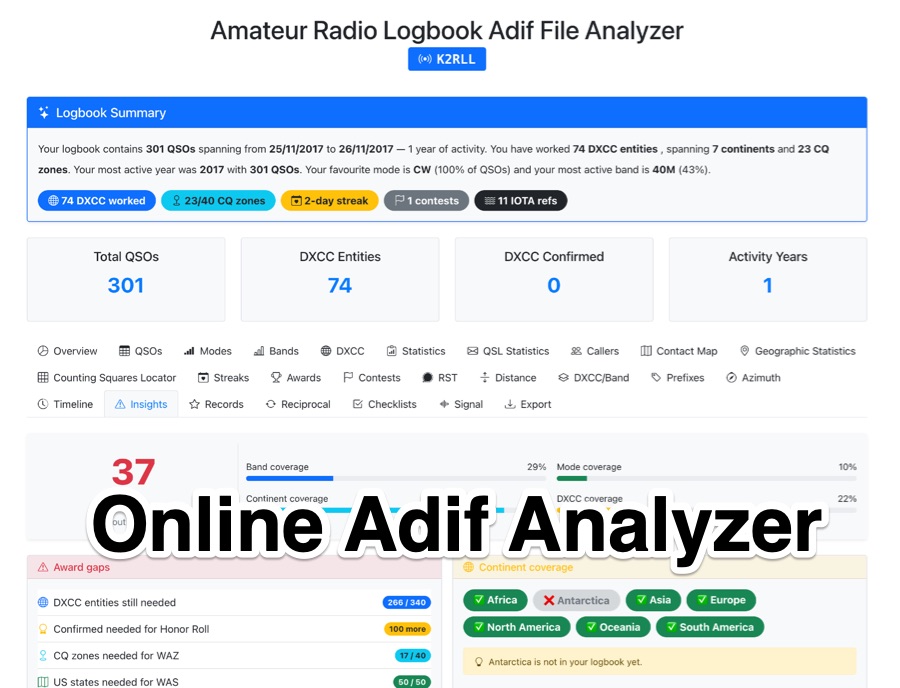 The _Amateur Radio Logbook ADIF File Analyzer_ processes ADIF files locally within the user's browser, ensuring no QSO data is uploaded to a server. It generates a visual map of contacts and detailed statistics across various parameters, including band, mode, time, grid squares, and DXCC entities. The tool offers insights into operating patterns and station performance without requiring any software installation. Users upload their ADIF log files directly, and the analysis is performed client-side, providing immediate results. The output includes charts and graphs that visualize QSO distribution and activity. This approach prioritizes user privacy and data security, as logbook information remains on the user's computer throughout the analysis process. The analyzer supports standard ADIF formats, enabling hams to quickly review their log data for trends and achievements. It is a free, open-source utility designed for general amateur radio log analysis.
 -
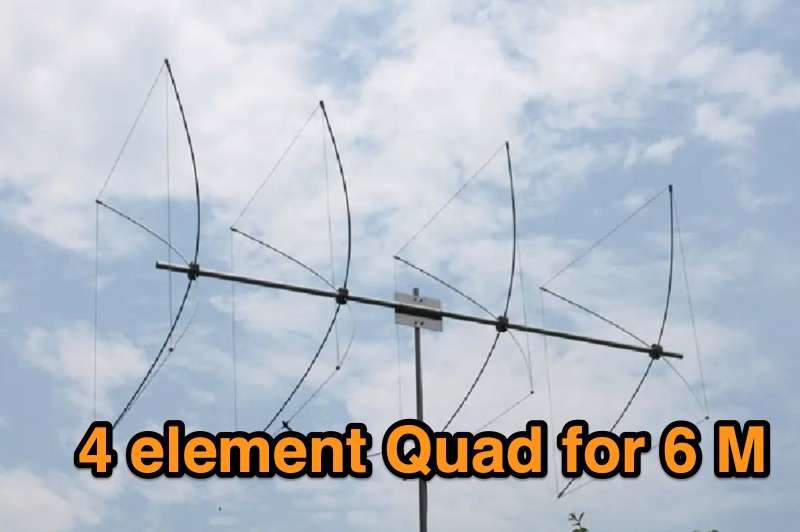 Details the construction of a portable 6-meter 4-element quad antenna, specifically designed for VHF and Field Day operations. The design emphasizes portability and rapid field assembly, utilizing a 10-foot boom, #12 bare wire elements, and fiberglass electric fence post spreaders. It presents specific dimensions for reflector, driven element, and directors, including spreader lengths, circumferences, and corner marks, all derived from a G0KSC design and modeled in EZNEC. The resource outlines the fabrication of synthetic lumber hubs that allow post-assembly adjustments along the boom, and describes spreader clamps made from ¾” OD fiberglass rod, drilled and tapped for 8-32 nylon thumbscrews to secure element wires. It provides instructions for reducing spreader ends to 0.370” OD for proper fit and details the assembly of the boom from two 1½” OD x 6’ aluminum tubes. Performance data from EZNEC modeling indicates a gain of 10.25 dBi (8.1 dBd) and a 20 dB F/B ratio at 50.150 MHz, with SWR values of 1.08, 1.09, and 1.11 at 50, 50.15, and 50.5 MHz respectively. The document includes a field test report from Field Day 2010, where the antenna was deployed at 21 feet, showing an SWR resonance 200 KHz below EZNEC predictions. It notes successful 5-watt QSOs into New York and Canada from Tennessee, highlighting the antenna's excellent directivity and gain compared to a 4 dBd Moxon. The antenna breaks down into easily transportable components, including two 5’ boom sections, a 3’ boom connector, 16 spreaders, and four element/spreader clamp assemblies.
 -
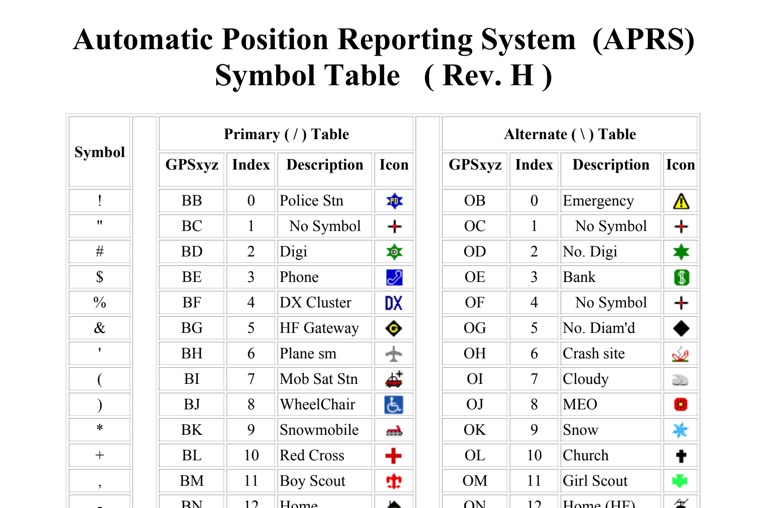 The four-page _APRS Symbol Table_ (Revision H) systematically lists 96 primary and 96 alternate Automatic Packet Reporting System symbols, each with its corresponding GPSxyz Index, a concise description, and a visual icon. For instance, the primary symbol '!' (GPSxyz BB) represents a "Police Stn," while its alternate counterpart '!' (GPSxyz OB) signifies "Emergency." The resource clearly delineates how specific ASCII characters map to distinct graphical representations on APRS displays, crucial for accurate situational awareness. It presents a direct, tabular format, making it an efficient reference for operators needing to quickly identify or interpret the myriad of icons used in APRS mapping applications. The table covers a broad spectrum of common APRS entities, from fixed stations like "Digi" (#) and "Home" (-) to mobile units such as "Car" (>) and "Plane sm" ('), alongside various weather phenomena and emergency services. Compiled by VK4KTP and featuring images by WA8LMF, the document serves as a definitive guide for understanding the visual language of APRS. It is particularly useful for those involved in tactical communications, public service events, or general APRS tracking, ensuring consistent symbol interpretation across different platforms and user interfaces.
 -
 This document serves as a reference guide for pilots interpreting the symbols used on Instrument Flight Rules (IFR) Enroute Low and High Altitude Charts for both the United States and Alaska. It focuses on six key categories of information critical for safe IFR navigation and it includes a section dedicated to Oceanic Route Charts for the North Atlantic and North Pacific regions.
 -
 This **PDF report** documents a _maritime mobile_ DXpedition operating from the _Southern Ocean_ near Antarctica, detailing antenna deployment strategies on a sailing vessel. It addresses power management systems for remote operations and propagation characteristics specific to polar regions on **20m and 40m** bands. Operational strategies include managing high-density pileups using split frequency operation and maintaining signal integrity during periods of high aurora activity. Equipment considerations cover specific transceiver models like the Icom IC-7300, antenna types optimized for marine vessel installation, and battery power systems for extended periods without shore power. The resource also examines the use of satellite communication for real-time log uploads and QSL confirmation from remote locations, and discusses mitigating signal degradation from ice accumulation on antennas. DXZone Focus: PDF report | Maritime Mobile DXpedition | Polar Propagation | Split Frequency Operation
 -
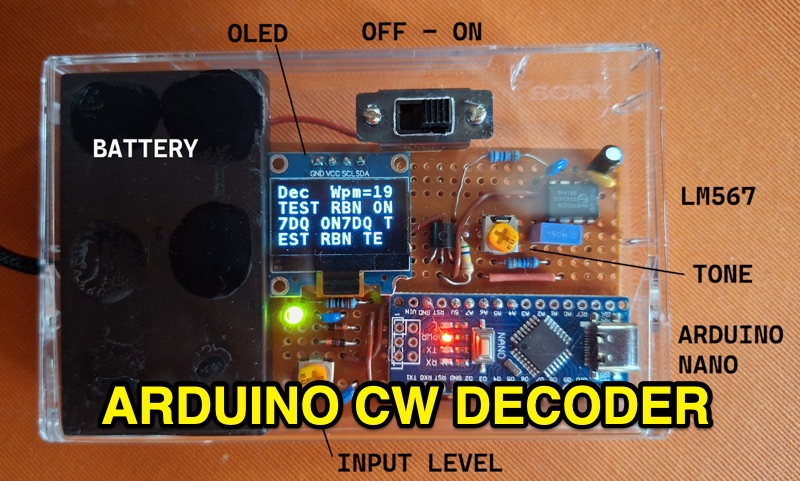 The project details the construction of a small, portable **CW decoder** built around an Arduino Nano and an LM567 tone decoder circuit. It integrates an OLED display for output and is powered by a 1200 mAh Li-Po battery. The Arduino Nano is programmed with a modified version of the OST Morse Box firmware, originally based on Budd, WB7FHC's work, provided as a HEX file for flashing. The LM567 output connects to Arduino pin D2, while pins A6 and A7 are grounded due to the absence of potentiometers, simplifying the circuit. Standard I2C connections are used for the OLED: SDA to A4 and SCL to A5. The entire assembly, including the Arduino, OLED, and decoder circuit, is mounted on a perfboard to fit precisely within an old cassette tape box. This design emphasizes portability and compact form factor. Parameters for the decoder can be adjusted using a dedicated Windows Control program, offering flexibility in operation. The resource provides practical insights into adapting existing firmware for specific hardware constraints and achieving a self-contained, battery-powered **Morse code** decoding solution.
 -
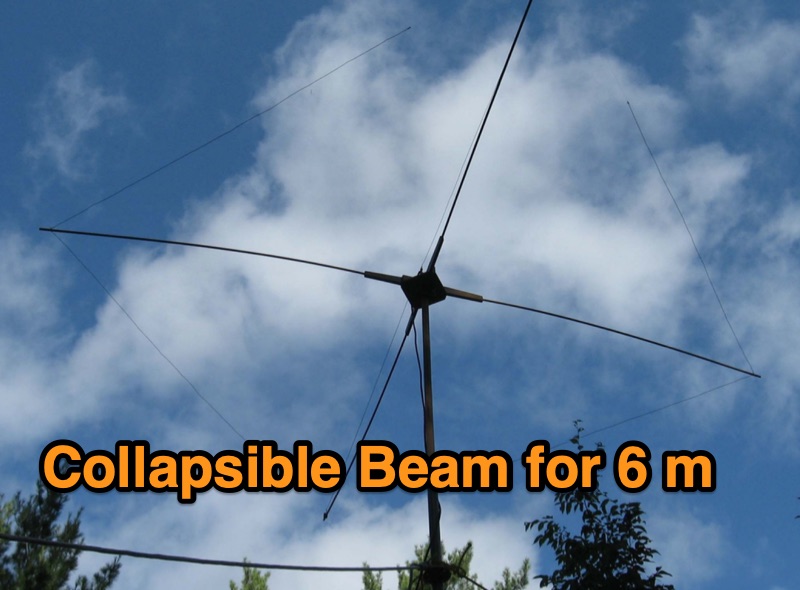 Designing a collapsible 6-meter beam antenna involves careful consideration of element geometry and feedline matching, as demonstrated by VE3SMA's project. The construction draws inspiration from foldable dipole concepts and established wire beam designs like the Penn. State 40m beam and the DJ4SA Spiderbeam. Utilizing **4NEC2 modeling**, the author optimized element lengths for gain and bandwidth, observing the impact of end loops on resonant frequency and the need for compensation. Feeding the approximately 25-ohm balanced antenna with 50-ohm unbalanced cable required a specialized network. This setup incorporates a choke **balun** and a matching section built from two series quarter-wave transformers using readily available 75-ohm cable. On-the-air results validate the design, including a successful 1st double hop Es QSO with 10 Watts and satisfactory performance in the CW WW VHF Contest from FN05, where 41 grids were worked with 100 Watts, showing improved performance over a simple dipole.
 -
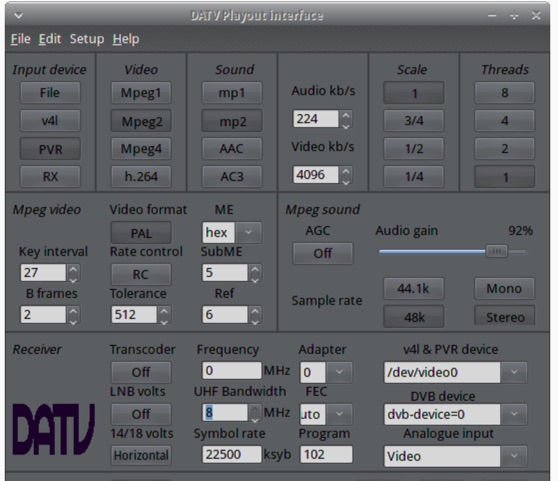 The ZL1WTT resource details an experimental software-based Digital Amateur Television (DATV) system, demonstrating the multiplexing of up to six standard-definition (SD) and one high-definition (HD) channel utilizing _h264 compression_. The author encountered peak data rates reaching 32 Mbit/s, necessitating a shift to Freeview and Sky settings (22.5M Sym/s 3/4FEC) to manage bandwidth. The setup employs four networked computers, with a laptop functioning as the multiplexer to re-code PIDs for various inputs, including looped MPEG2 playlists, MPEG2 encoder card input from a VCR, satellite feeds, and an off-air UHF receiver. The system highlights the inherent flexibility of the DVB transport stream, supporting diverse formats such as MPG2, h264, AC3, and AAC. A significant advantage of this software-defined approach is the absence of video quality degradation from stored MPEG2 files to the displayed output, coupled with the ease of reconfiguring settings for MPEG2 encoder cards (e.g., size, bit-rate, frame rate, video input, coding format) and satellite receiver cards (e.g., frequency, LNB volts, symbol rate, FEC). The author also discusses the development of a new graphical user interface (GUI) using _Gambas_ for Linux, aiming to simplify configuration for this DATV project. Specific hardware components mentioned include Hauppauge WinTV PVR-150 and Nova-S plus cards, with a focus on optimizing analog video input via Y/C (S-video) to minimize frequency roll-off. The resource also provides insights into data rates for HD (1080i) content, recommending 8 to 12 Mb/s for optimal performance. Software utilized includes _Ubuntu Studio 10.04_, WinFF, VLC, and TMPGEnc Editor, underscoring the project's reliance on open-source tools and a foundational understanding of LAN networks and DVB transport streams.
 -
 2013 Father and Son DX-pedition to St Barthelemy, This recap of a June 2013 trip to the Caribbean will chase your winter blues away
 -
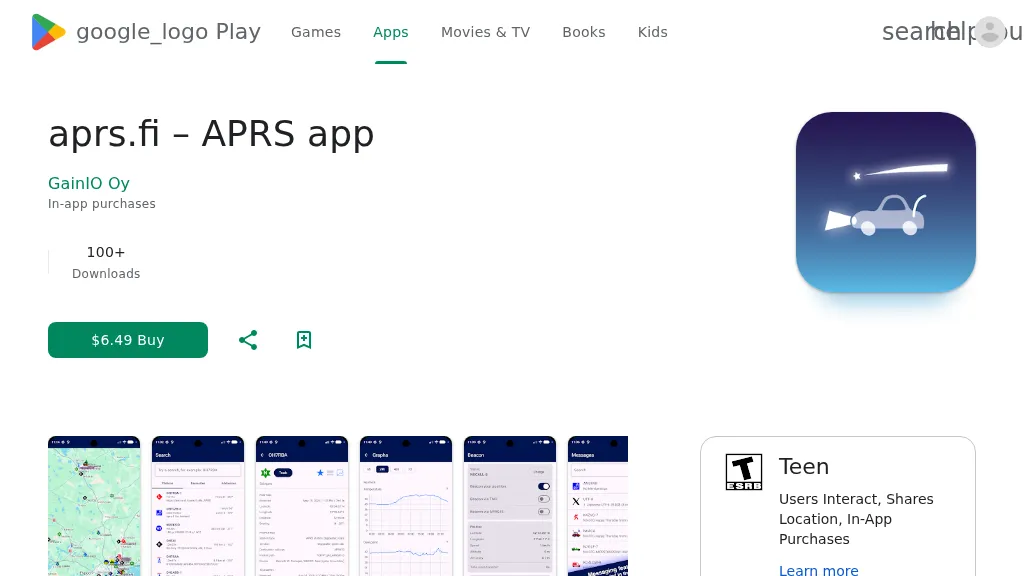 The aprs.fi Android application offers immediate, real-time access to APRS position information, weather reports, and telemetry graphs, allowing users to zoom and browse stations globally without delay. It includes features like callsign and address search with history, multi-station tracking, and map filtering for elements such as weather stations and AIS targets. The app also supports KML and GeoJSON overlay files for enhanced map visualization. Users can beacon their position directly to aprs.fi or connect wirelessly to a Bluetooth, BLE, WiFi, or USB-attached TNC for receiving and transmitting position beacons without an internet connection. The application runs on the robust and fast aprs.fi database, providing _Dark Mode_ support for improved ergonomics in low-light conditions and high-resolution graphics for modern displays, including the full APRS symbol set. While the core application is a one-time purchase, some advanced functionalities, such as APRS text messaging, a high-performance software DSP modem, and _APRS-IS_ beaconing with up to **10 callsign profiles**, require an additional "Extra Features" subscription. This subscription also unlocks RX iGate functionality and extended time ranges for map and graph views, expanding its utility for serious APRS operators.
 -
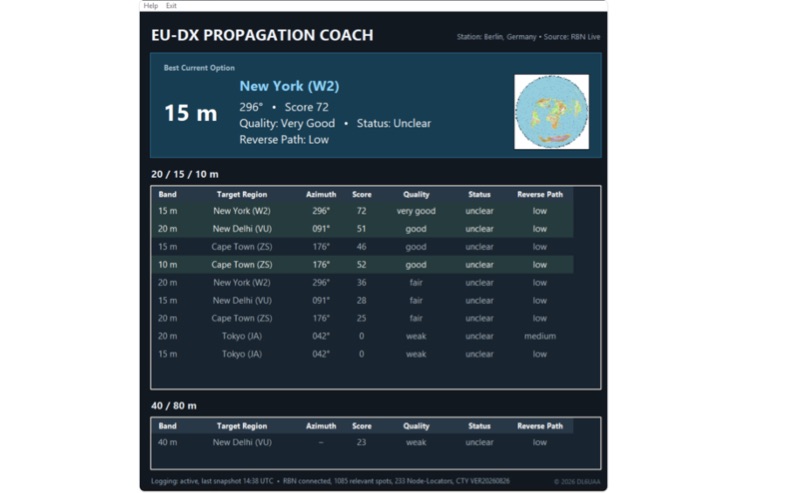 EU-DX Propagation Coach v0.9.3 processes live _Reverse Beacon Network_ (RBN) spot data, providing practical DX propagation guidance for European radio amateurs. The software offers a real-time RBN-based propagation overview, including directional guidance, enabling users to optimize band usage based on current conditions. It features five selectable European station locations and ten global DX reference centers, delivering propagation scoring for the 10, 15, and 20-meter bands, alongside a 40/80-meter overview. Dynamic azimuth and reverse-path information are calculated for each DX direction, assisting operators in precise antenna aiming. The application is distributed as a Windows ZIP archive, requiring full extraction before execution. A SHA-256 hash is provided for download integrity verification, ensuring the downloaded file matches the original. Users should note the software is provided "AS IS," and DL6UAA disclaims liability for any resulting damage or data loss. The tool is designed to run on Windows platforms, offering a dedicated utility for real-time propagation analysis.
 -
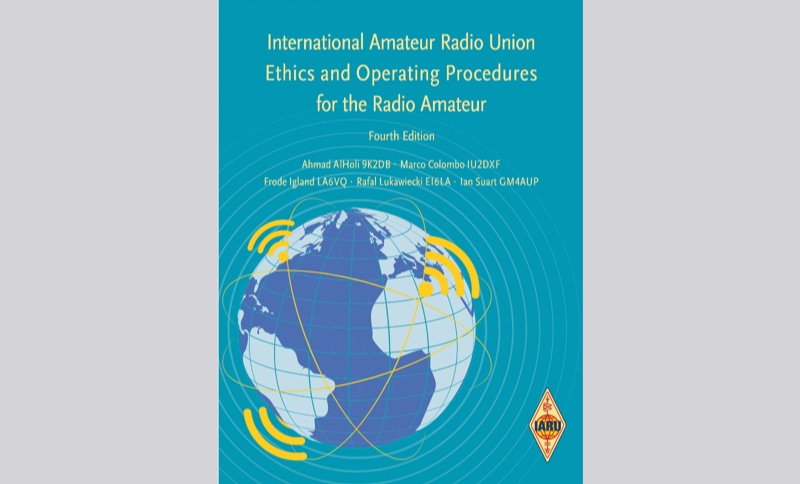 Presents the 4th edition of the IARU Region 1 Ethics and Operating Procedures for the Radio Amateur, a fully rewritten guide published in July 2026. It establishes a shared basis for respectful and effective communication within the amateur radio community, building upon over fifteen years of prior work. The document details the purposes of amateur radio, principles of non-interference, electromagnetic compatibility, and station safety. It specifies operating procedures, including listening practices, adherence to IARU and national band plans, appropriate transmission content, use of Q-codes, and the phonetic alphabet. The guide provides instructions for conducting QSOs across phone, CW, and various digital modes. Specific sections address managing pileups, participating in contesting, engaging in DX and DXpedition operations, operating portable or mobile, and conducting station testing. Further sections cover VHF and UHF operating considerations, ensuring a comprehensive resource for both experienced operators and those new to the hobby.
 -
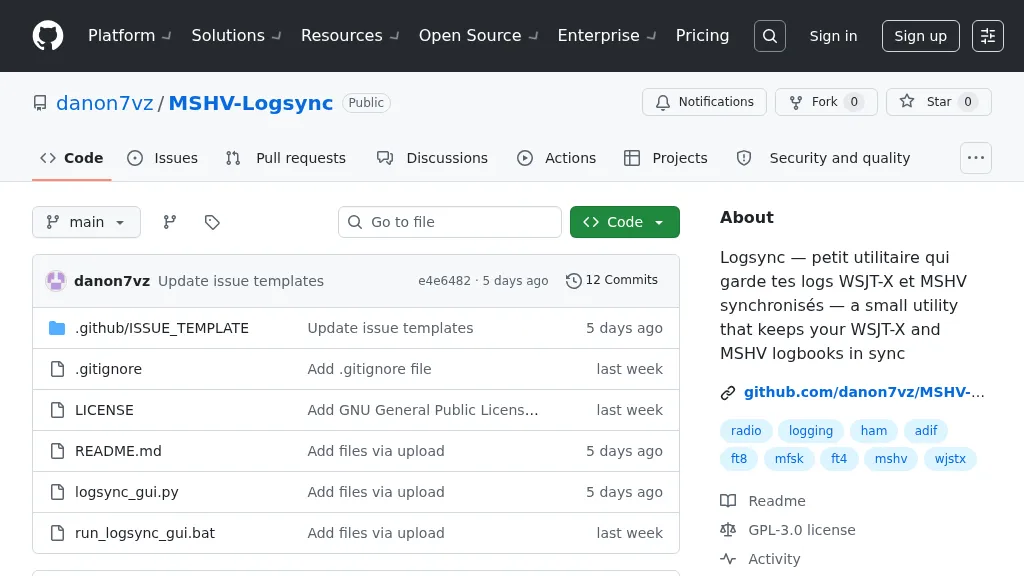 Manages log consistency across multiple digital mode applications, specifically addressing the common issue of log divergence between _MSHV_ and _WSJT-X_ for FT8, FT4, and other weak-signal modes. This prevents duplicate contacts and ensures accurate DX tracking when using both programs. The utility computes a deduplicated union of entries from both `_mshvlog.edim` and `_wsjtx.log` files, then updates each log with missing QSOs. It supports a deduplication key based on callsign, date, time (to the minute), band (derived from frequency), and mode. The tool is available as a standalone Windows executable or a Python version requiring Python 3 with _Tkinter_. Users select log folders, close both applications, and initiate the 'Merge' function. The process includes automatic timestamped backups of log files before any modifications, safeguarding QSO data.